

Skildring
Pay affiliate commissions as store credit (virtual monetary value) instead of cash with the Affiliate for WooCommerce plugin and Smart Coupons plugin integration.
🎯 Join 6760+ paid users who trust Affiliate for WooCommerce you to set up and run their successful affiliate program. Track referrals, sales, and commissions, manage payouts, create campaigns and more from one place.
🎯 Trusted by 26200+ paid users, Smart Coupons is the original and all in one WooCommerce advanced coupons plugin. Enjoy discount rules, gift cards, store credit, BOGO deals, advanced restrictions, auto-apply and more in a single package.
Expand your affiliate payouts beyond PayPal, Stripe and bank transfers by sending store credit directly to the desired affiliates.
Select eligible referrals, choose «Coupon: Store Credit» payout option and send. That’s it.
Affiliates can use this store credit at checkout to make purchases on your store until exhausted.
Note – You can send store credit payouts to affiliates automatically or manually.
Requirements
Install and activate Affiliate for WooCommerce plugin and Smart Coupons plugin, and WooCommerce, ofcourse.
Get your own money back
For example, if affiliate Robert Evans earns $82 in commissions, you can send him the same amount as store credit. Robert can then use it to make purchases in your store.
Ultimately, the commissions you pay as store credit are returned to you when affiliates make purchases.
Reduce cash payouts
Paying via store credit allows you to avoid instant and regular cash payouts to affiliates.
In case of free products, cash commissions can be costly, but offering store credit can attract more affiliates.
Tracking store credits
Affiliates will find the store credit coupon code in the existing email sent by Affiliate for WooCommerce plugin. They can also view their store credit balance in the My Account > Coupons section.
Additionally, affiliates can track their store credit payouts directly under their My Account in a dedicated dashboard provided by Affiliate for WooCommerce plugin.
No coupon hassles
When you pay affiliates with store credit, the corresponding coupons will automatically appear in the Coupons dashboard – no need to create them manually.
Prevent store credit misuse
Store credit payouts are restricted to the affiliate’s email address. This ensures that only the intended affiliate can use it for purchases in your store.
Note – You have full flexibility to pay affiliates using store credit – whether it’s a single affiliate, multiple affiliates, or all affiliates. Plus, you can switch payout methods effortlessly: pay via store credit this month, PayPal next month, and so on.
Get this plugin today and enhance your WooCommerce affiliate program!
Documentation
Try our plugin demos
Our other free plugins
- Affiliate CF7 Integration – Customize affiliate registration forms with Contact Form 7.
- Temporary Login Without Password – Create secure, self-expiring automatic login links.
- Smart Manager – Smart Manager – Advanced WooCommerce Bulk Edit & Inventory Management – Advanced bulk edit for WooCommerce & WordPress.
- Auto Apply Coupons by Smart Coupons for WooCommerce – Auto apply discount coupons or promo codes at cart/checkout for customers.
- URL Coupons by Smart Coupons for WooCommerce – Auto apply discounts for your customers in one click of the URL.
StoreApps’ other Pro plugins
- Smart Subscriptions – Launch and manage recurring products in just a few clicks.
- Smart Rental & Booking – Manage every rental from one dashboard, without spreadsheets.
- Smart Offers for WooCommerce – Targeted one-click upsells, BOGO, order bumps and Buy Now buttons for direct checkout.
- Email Customizer for WooCommerce – Customize default WooCommerce transactional emails to match your brand. Edit text, colors and other elements in a live preview.
View out all our WooCommerce plugins
Spread the love
Liked this plugin? Please consider leaving five-stars for the plugin. It helps fellow website owners benefit from it!
Have any questions?
Feel free to contact us.
Skjermbilete
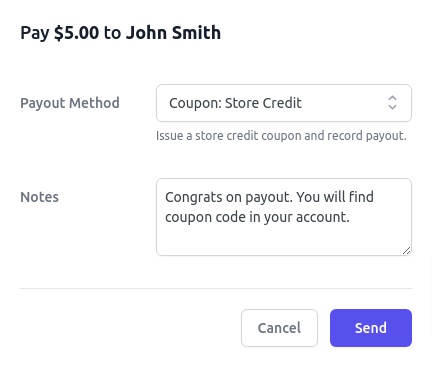
Payout via Coupon: Store Credit
Installasjon
Minimum Requirements
Install and activate these plugins: Affiliate for WooCommerce, Smart Coupons, and WooCommerce.
Automatic installation
Automatic installation is the easiest option – WordPress will handle the file transfer, and you won’t need to leave your web browser. To do an automatic install of Affiliate Store Credit Payouts Integration For WooCommerce, log in to your WordPress dashboard, navigate to the Plugins menu, and click “Add New.”
In the search field type “Affiliate Store Credit Payouts Integration For WooCommerce,” then click “Search Plugins.” Once you’ve found us, you can view details about it such as the point release, rating, and description. Most importantly of course, you can install it by! Click “Install Now,” and WordPress will take it from there.
Manual installation
- Unzip and upload contents of the plugin to your /wp-content/plugins/ directory
- Activate the plugin through the WordPress admin > Plugins > Affiliate Store Credit Payouts Integration For WooCommerce
- Click on WordPress admin > WooCommerce > Affiliates menu to access the dashboard
Vanlege spm.
-
1. What other payout options Affiliate for WooCommerce provide?
-
You can either pay manually via PayPal, Stripe & bank transfers or set up automated payouts via PayPal or Stripe or Coupons. You can also pay via Reward Points (only mark).
-
2. Does Affiliate for WooCommerce support WooCommerce Subscriptions?
-
Yes. It allows you to provide commissions to affiliates on parent subscription orders and renewals.
-
3. Can affiliate use store credit for subscription renewals?
-
Yes, store credit is applied at initial signup and if sufficient balance, it will automatically apply to future renewals until it’s used up. Works with WooCommerce Subscriptions plugin.
-
4. Does this require any coding?
-
Not at all. It’s very easy.
Omtalar
There are no reviews for this plugin.
Bidragsytarar og utviklarar
“Affiliate Store Credit Payouts Integration For WooCommerce” is open source software. The following people have contributed to this plugin.
Contributors


Omset “Affiliate Store Credit Payouts Integration For WooCommerce” til ditt eige språk.
Interested in development?
Les kjeldekoden, sjekk SVN-lageret eller abonner på utviklingsloggen med RSS.
Endringslogg
1.0.5 (01.04.2026)
- New: Compatibility with WordPress (6.9.4), WooCommerce (10.6.2), Affiliate For WooCommerce (9.3.0), Smart Coupons (9.74.1)
- New: Installation steps in the readme
- Update: Readme changes
- Update: POT file
1.0.4 (21.11.2025)
- New: Compatibility with WooCommerce (10.3.5), Affiliate For WooCommerce (8.54.0)
- Update: POT file
1.0.3 (19.09.2025)
- New: Compatibility with WooCommerce (10.1.2), Affiliate For WooCommerce (8.45.0)
- Fix: Payout via Coupons setting does not show «Store Credit/Gift Certificate» option when Smart Coupons plugin is network activated on a multi-site
- Update: Admin notice to show only missing required plugins [Admin]
- Update: POT file
1.0.2 (24.04.2025)
- New: Compatibility with WordPress (6.8.0), WooCommerce (9.8.1), Affiliate For WooCommerce (8.29.0)
- Fix: Affiliates dashboard not loading when Smart Coupons plugin is deactivated [Admin]
- Update: POT file
1.0.1 (20.03.2025)
- New: Logo, Banners, Screenshot for the plugin
- New: Compatibility with WooCommerce (9.7.1), Affiliate For WooCommerce (8.25.0)
- Update: Text improvements
- Update: Readme
- Update: POT file
1.0.0 (23.01.2025)
- Initial release