Skip to content
WordPress.org

Norsk (Nynorsk)

  • Bunader
  • Innstikk
  • News
  • Om
  • Bidra til nynorskomsetjinga
  • Remembers
  • Blocks
  • Kontakt oss
  • Education
  • WP-CLI
  • Get WordPress
Get WordPress
WordPress.org

Plugin Directory

WP Frontend Profile

  • Submit a plugin
  • My favorites
  • Log in
  • Submit a plugin
  • My favorites
  • Log in

Dette innstikket er ikkje testa med dei tre siste utgåvene av WordPress. Det kan henda det ikkje blir vedlikehalde lenger, og kan ha problem med nyare versjonar av WordPress.

WP Frontend Profile

Av Glowlogix
Last ned
  • Detaljar
  • Omtalar
  • Installasjon
  • Utvikling
Hjelp

Skildring

WP Frontend Profile gives you the ability to add a extensible user profile section to the frontend of your WordPress website. By default the plugin adds two tabs to the frontend profile. One of these tabs, titled profile, allows a user to edit their user data including email, first and last names, URL and bio (description). The password tab allows a user to change their password for the site.

Plugin Extensibility

As the frontend profile is rendered with tabs you can easily add your own tabs with your own fields to store user meta data. Tabs and fields are added through filters and all the saving of the data is taken care of for you.

You can add the following field types:

  • WYSIWYG
  • Select
  • Multi Select
  • Radio
  • Text Area
  • Checkbox
  • Password
  • Email
  • Text

See FAQs for how to add our own fields and tabs.

Profile Output

To output the frontend profile feature you can use the following shortcodes in editor:

  • Profile page [wpfep-profile]
  • Edit profile [wpfep]
  • Register page [wpfep-register]
  • Login page [wpfep-login]

Features

  • Added Login Widget
  • Addon for Mailchimp
  • Added Content Restriction feature for paid members.

Skjermbilete

WP frontend profile edit page.
WP frontend profile register page.
WP frontend profile login page.
WP frontend profile setting area.
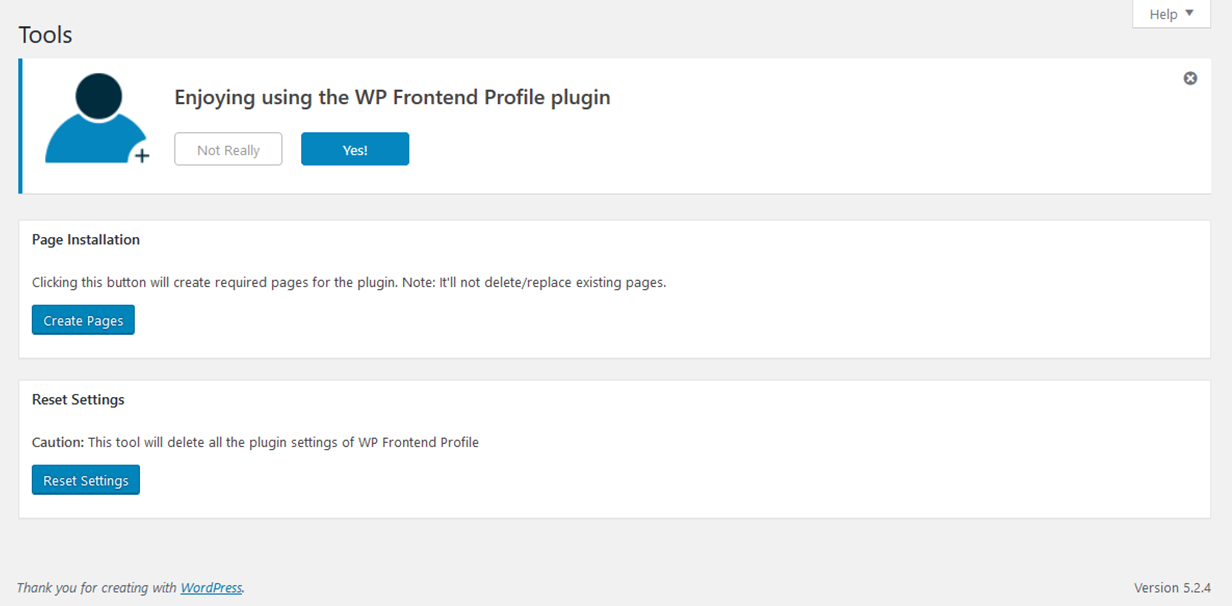
WP frontend profile tool area.
WP frontend profile system status area.

Blokker

Denne utvidinga gjev 1 blokk.

  • Frontend Profile

Installasjon

  1. Upload the plugin folder to the /wp-content/plugins/ directory
  2. Activate the plugin through the «Plugins» menu in WordPress

After having installed the plugin: 1. Create a new Page “Profile” for profile and insert shortcode [wpfep-profile] 2. Create a new Page “Edit Profile” for editing profile and insert shortcode [wpfep] 3. Create a new Page “Login” for login form and insert shortcode [wpfep-login] 4. Create a new Page “Register” for registration form and insert shortcode [wpfep-register] 5. Set the Edit Page option from Pages tab on settings page.

Vanlege spm.

For more information and more extensive documentation about this plugin checkout the WP Frontend Profile Wiki on Github.

How do I add my own tab to the profile output?

Tabs can be added using the wpfep_tabs filter provided. Below is an example of how to add a tab after the default Profile and Password tabs.

<?php
function wpmark_add_tab( $tabs ) {

    /* add our tab to the tabs array */
    $tabs[] = array(
        'id' => 'wpmark_tab',
        'label' => 'Testing',
        'tab_class' => 'testing-tab',
        'content_class' => 'testing-content',
    );

    /* return all the tabs */
    return $tabs;

}

add_filter( 'wpfep_tabs', 'wpmark_add_tab', 30 );
?>

Note here the priority of 30 which means after the Profile tab (10) and the Password tab (20).

How do I add fields to a tab?

Fields can be added to a tab using a dynamic filter named wpfep_fields_$tab_id. The tab ID is the id of tab as declared when adding the tab (see FAQ above). This means that you can add fields to any tab even the default tabs. Below is an example of how you would add fields to a tab with the ID of wpmark_tab:

<?php
function wpmark_add_tab_fields( $fields ) {

    $fields[] = array(
        'id' => 'testing_field',
        'label' => 'Testing',
        'desc' => 'Just testing.',
        'type' => 'text',
        'classes' => 'testing',
    );

    return $fields;

}

add_filter( 'wpfep_fields_wpmark_tab', 'wpmark_add_tab_fields', 10 );
?>

Are there any field IDs I cannot use?

Yes there are two field IDs reserved which are user_email and user_url. This is because you should not save new meta data with these keys are they already exist, but not in the user_meta table.

Omtalar

Frontend Profile

lordkahler 6. april 2026 1 reply
One of the easiest plugins to use

AIO admin pack

Hossein 7. juli 2023
Hi,Thanks for creating this good and super useful plugin.

Suggestion

Hermann Matthias 2. juni 2022
Basicly a vey good idea, but it should have options to choose: – yes/no LOGIN page – yes/no REGISTER page – yes/no those 2 PROFILE PAGES in many cases the user has already a special styled login or register page, the profile form ist not really fitting, but that we can ajust with the editor and nice regards from the Philipines

Good Plugin

sorenaphysio 20. desember 2021
Simple and Easy to use with many options

Works but have some feedback here…

Liang 27. november 2021 1 reply
The newest version causes some conflict with my website and I have to use the 0.2.2 version. Overall, I do recommend the author, developer focus on improving the «frontend user editing» instead of the «login page». The «frontend user editing» is the thing we only needed. Thanks for developing such an awesome plugin.

Not good enough

Claudio 24. november 2021
There is no form customization. Apparently there is no way to user upload a picture for their own profile. It would be good if the pages created by the plugin could be shown under the user profile picture as a user menu. I hope I am helping to increase the plugin capability.
Les alle 9 omtalar

Bidragsytarar og utviklarar

“WP Frontend Profile” is open source software. The following people have contributed to this plugin.

Contributors
  • Glowlogix
  • Mark Wilkinson

Omset “WP Frontend Profile” til ditt eige språk.

Interested in development?

Les kjeldekoden, sjekk SVN-lageret eller abonner på utviklingsloggen med RSS.

Endringslogg

For the plugin’s changelog, please see the changelog page on GitHub.

Om

  • Version 1.3.9
  • Last updated 6 månader sidan
  • Active installations 100+
  • WordPress version 4.0.1 eller nyare
  • Tested up to 6.8.8
  • PHP version 5.2.17 eller nyare
  • Language
    English (US)
  • Tags
    loginprofileregisteruser metausers
  • Avansert vising

Vurderingar

4.3 out of 5 stars.
  • 6 5-star reviews 5 stars 6
  • 1 4-star review 4 stars 1
  • 1 3-star review 3 stars 1
  • 1 2-star review 2 stars 1
  • 0 1-star reviews 1 star 0

Your review

See all reviews

Contributors

  • Glowlogix
  • Mark Wilkinson

Hjelp

Har du noko å seia? Treng du hjelp?

Sjå hjelpeforumet

Donate

Would you like to support the advancement of this plugin?

Donate to this plugin

  • About
  • News
  • Hosting
  • Privacy
  • Showcase
  • Themes
  • Plugins
  • Patterns
  • Learn
  • Support
  • Developers
  • WordPress.tv ↗
  • Get Involved
  • Events
  • Donate ↗
  • Swag ↗
  • WordPress.com ↗
  • Matt ↗
  • bbPress ↗
  • BuddyPress ↗
WordPress.org
WordPress.org

Norsk (Nynorsk)

  • Visit our X (formerly Twitter) account
  • Visit our Bluesky account
  • Visit our Mastodon account
  • Visit our Threads account
  • Visit our Facebook page
  • Visit our Instagram account
  • Visit our LinkedIn account
  • Visit our TikTok account
  • Visit our YouTube channel
  • Visit our Tumblr account
Kode er poesi.
The WordPress® trademark is the intellectual property of the WordPress Foundation.