

Skildring
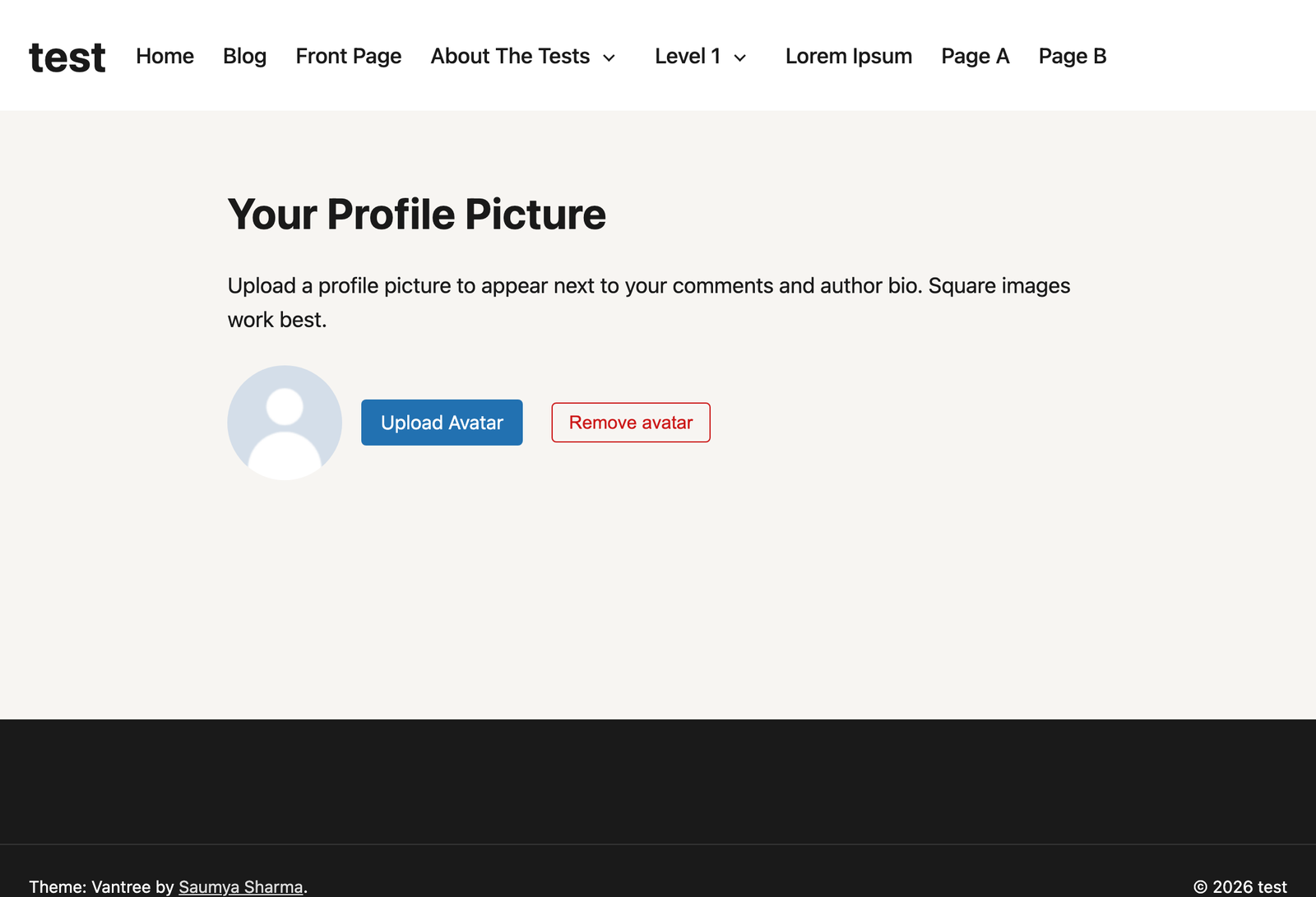
Avatarly adds a local, self-hosted avatar system to WordPress. Users can upload a profile picture directly on your site instead of relying on Gravatar, and site owners get full control over who’s allowed to upload, how avatars look, and where uploads are permitted.
Three ways to let users manage their avatar on the front end:
- Shortcode —
[avatarly] - Widget — add the «Avatarly (Legacy)» widget to any sidebar (classic, non-block themes)
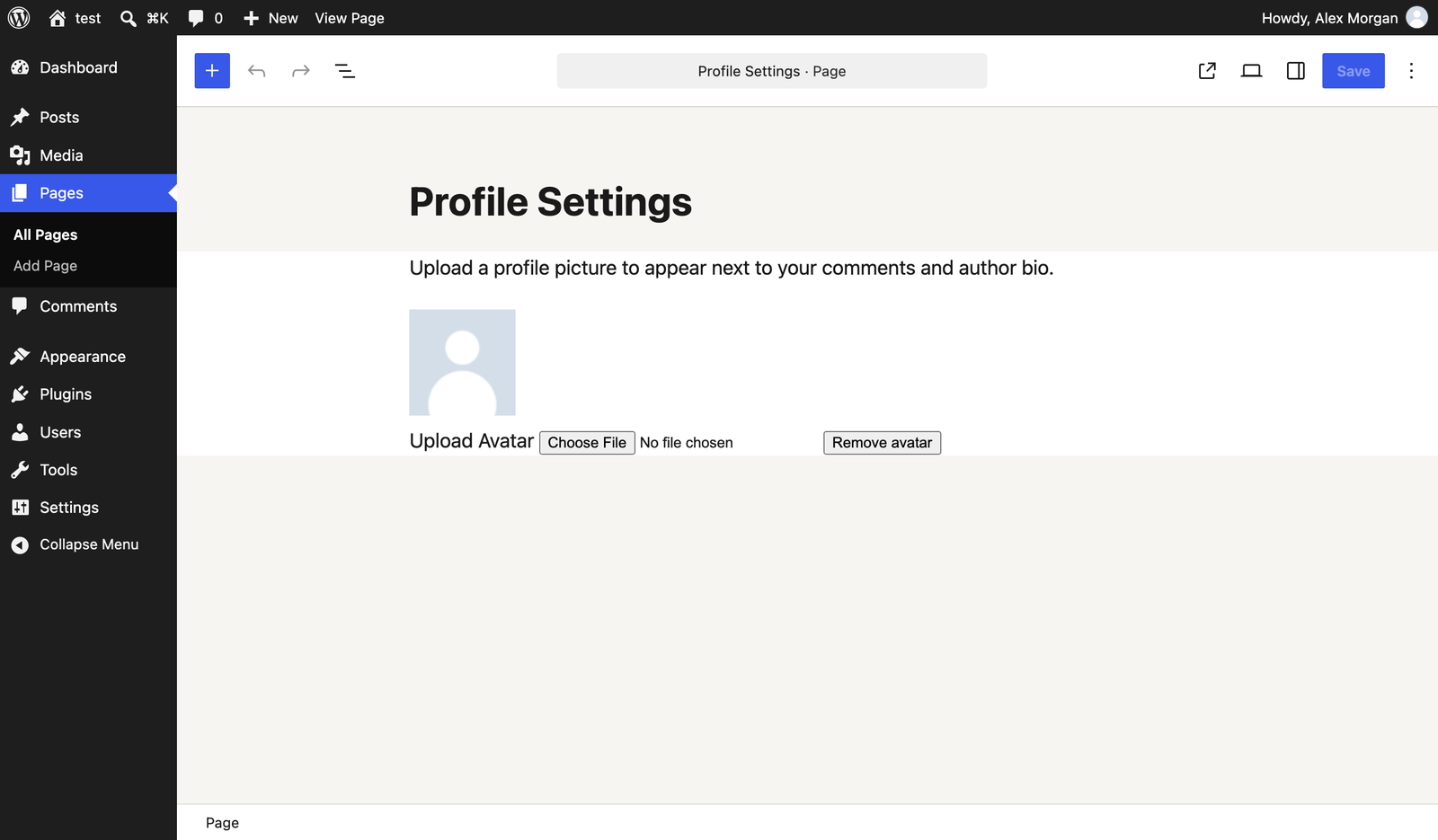
- Gutenberg block — search for «Avatarly» in the block inserter
Avatars can also always be managed from the standard WordPress Edit Profile screen.
Key features
- Local avatar storage — no data sent to Gravatar unless you choose to keep it as a fallback.
- Drag-and-drop / AJAX upload on the front end (progressively enhanced; falls back to a normal form for no-JS visitors).
- Built-in crop and reposition popup: drag to pan and use the zoom slider to frame the shot before saving, or skip it to use the automatic center crop.
- Strict upload validation: real MIME/extension checks, image verification, and file-size limits — not just a filename blacklist.
- Automatic EXIF/GPS metadata stripping from uploaded images.
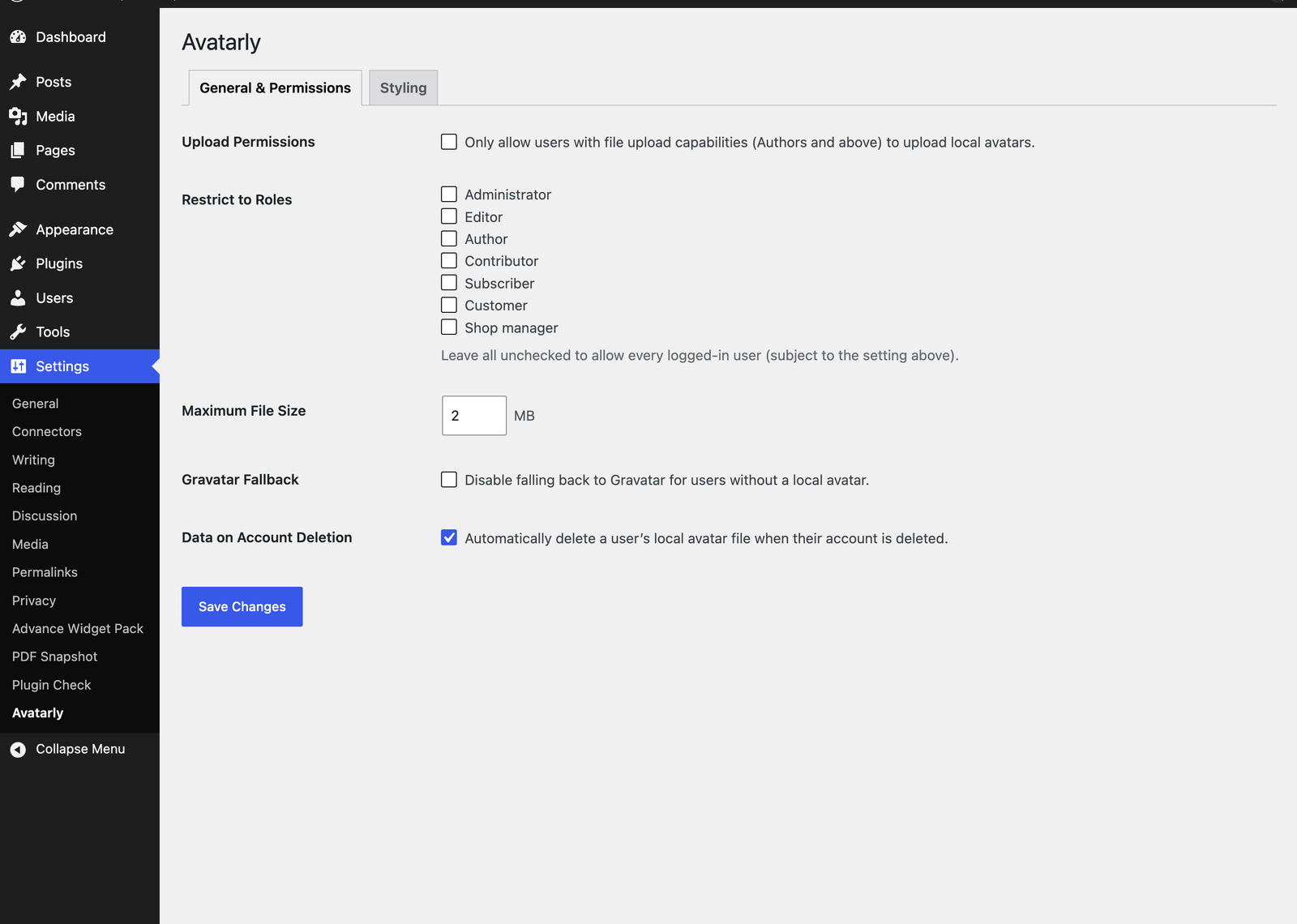
- Fine-grained permissions: restrict uploads by capability and/or by specific roles.
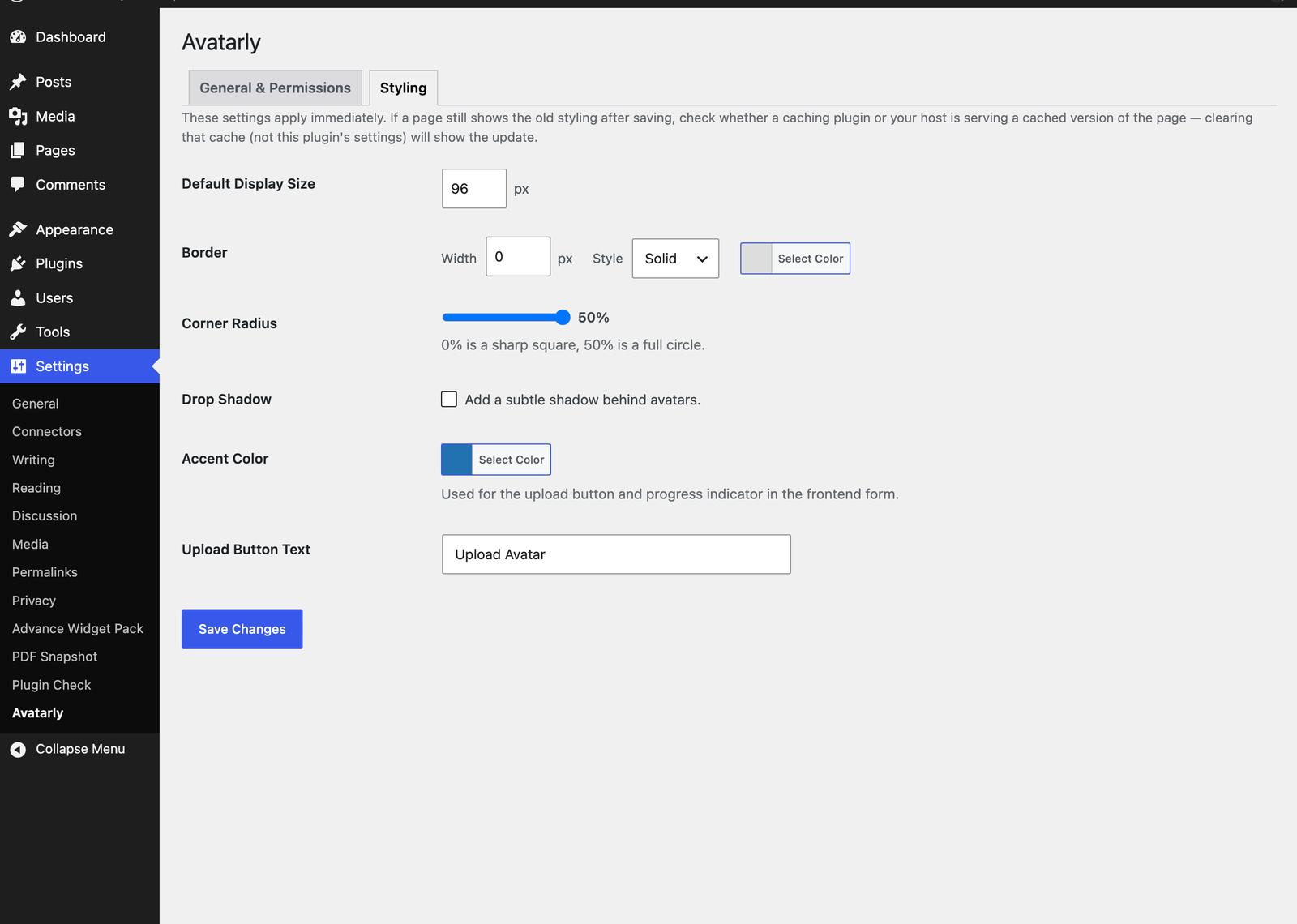
- A dedicated Styling tab: size, shape (circle/rounded/square), border, shadow, accent color, and button text.
- Optional automatic cleanup of avatar files when a user account is deleted.
- Translation ready.
Developer hooks
avatarly_avatar_size(filter) — change the avatar size used when generating a sized copy.avatarly_avatar_data(filter) — filter the final avatar data array.avatarly_avatar_html(filter) — filter the rendered<img>HTML.avatarly_avatar_uploaded(action) — fires after a successful upload.avatarly_avatar_deleted(action) — fires after an avatar is removed.
Skjermbilete
Blokker
Denne utvidinga gjev 1 blokk.
- Avatarly Lets the logged-in user upload or remove their local avatar.
Installasjon
- Upload the
avatarlyfolder to/wp-content/plugins/, or install it through the Plugins screen directly. - Activate the plugin through the «Plugins» screen in WordPress.
- Visit Settings Avatarly to configure permissions and styling.
- Add the
[avatarly]shortcode to a page, add the «Avatarly (Legacy)» widget to a sidebar, or insert the «Avatarly» block wherever logged-in users need to manage their avatar.
Vanlege spm.
-
Is this a Gravatar alternative, or does it replace Gravatar entirely?
-
It works as a Gravatar alternative, but by default it layers on top rather than replacing it outright: if a user hasn’t uploaded a local avatar, WordPress falls back to Gravatar (or your configured default) as usual. You can disable that fallback in Settings Avatarly General & Permissions if you want local avatars only.
-
What image types are supported?
-
JPG, PNG, GIF, and WebP.
-
Can I choose which part of my photo is used?
-
Yes. When you select or drop an image, a crop popup lets you drag to reposition and zoom before saving. Selecting «Skip» uploads the image with an automatic center crop instead.
-
Can I restrict who is allowed to upload an avatar?
-
Yes. Under Settings Avatarly General & Permissions you can require the
upload_filescapability and/or restrict uploads to specific roles. -
Where are avatar files stored?
-
In
wp-content/uploads/avatarly/, following WordPress’s standard year/month upload structure. -
I changed a styling setting but the site still looks the same
-
Styling settings take effect immediately — if a page still shows the old look after saving, a caching plugin (or your host) is likely serving a cached copy of that page from before the change. Clear that cache (or wait for it to expire) rather than re-saving the setting.
-
What happens to avatar files if I delete a user?
-
By default nothing is deleted automatically. You can enable automatic cleanup on user deletion in the General & Permissions tab.
Omtalar
There are no reviews for this plugin.
Bidragsytarar og utviklarar
“Avatarly – Custom User Avatars & Local Profile Pictures” is open source software. The following people have contributed to this plugin.
Contributors
Omset “Avatarly – Custom User Avatars & Local Profile Pictures” til ditt eige språk.
Interested in development?
Les kjeldekoden, sjekk SVN-lageret eller abonner på utviklingsloggen med RSS.
Endringslogg
1.0.8
- Shortened the readme’s short description — the previous one exceeded WordPress.org’s 150-character limit and was being truncated on import.
1.0.7
- Updated the plugin title and descriptions for clarity — no functional changes.
1.0.6
- Fixed the «Square» shape option silently ignoring the Corner Radius slider, so a square avatar could never actually show rounded corners. Removed the separate Shape setting — Corner Radius (0% = sharp square, 50% = full circle) now controls the shape on its own.
- Added a note that styling changes take effect immediately, but a caching plugin or host-level page cache may still show an older cached version of a page until that cache is cleared.
- Cleaned up alignment and spacing on the Settings screen so fields with multiple controls (e.g. Border width/style/color) line up consistently.
1.0.5
- Fixed the Settings Avatarly «Avatar size» option only resizing the avatar visually via CSS, without changing the actual image file served or its width/height attributes. This could make avatars look blurry or stretched at a larger size, since the smaller original file was being scaled up by the browser. Avatars now correctly generate and serve a real image file matching the configured size, everywhere they’re displayed.
1.0.4
- Confirmed compatible with WordPress 7.1.
1.0.3
- Fixed the admin «Edit User» profile screen (e.g. an administrator uploading an avatar for another user) not saving a newly-selected avatar at all: the selected filename showed correctly in the field, but the page reloaded with no changes and no error. WordPress core’s own user-profile form doesn’t set
enctype="multipart/form-data", since core itself has no file upload there — without it, the browser can’t actually send file data on submit. The form now correctly includes this attribute so avatar uploads on that screen work as expected.
1.0.2
- Security hardening: the avatar uploads subfolder now writes its own .htaccess/index.php to deny script execution as a defense-in-depth measure, and the upload/delete REST endpoints are now rate-limited per user.
1.0.1
- Removed the Custom CSS settings field. Per WordPress.org plugin guidelines, plugins may not let users save arbitrary custom CSS/JS/PHP; all supported styling (size, shape, border, shadow, accent color) is already exposed as dedicated controls in Settings Avatarly Styling.
1.0.0
- Initial release, including a crop/reposition popup (drag to pan, zoom slider, skippable) for the front-end upload flow.