

Skildring
Build Google Ads Customer Match lists from your WooCommerce orders: one CSV file per billing country, updated automatically on a schedule. Each country file is downloadable via a private and secure (tokenized) URL — ideal for marketing teams that run per-country campaigns and want clean, single-market audience lists.
The values are hashed with the same SHA-256 normalization used by both Google Ads Customer Match and Meta Ads Custom Audiences, so the same file can also be uploaded manually to Meta Ads Manager (see FAQ).
Why this export?
Not all purchases are captured by Google Ads tracking; periodic uploads of Customer Match Lists help targeting and campaign performance. Even Google’s automatic conversion-based customer lists (auto-enabled for eligible accounts from August 2026) only contain tag-tracked conversions — this plugin exports from the order database itself, so ad-blocked, phone, offline and historical orders are included too (see FAQ). The export reflects your order database as-is — applying your store’s consent choices and legal requirements to it is your responsibility as the merchant (see the GDPR / privacy FAQ).
Why per-country files?
Marketing teams optimize Google Ads campaigns per country. Mixing a German audience into a Romanian campaign’s match list pollutes the targeting. This plugin keeps each market in its own file.
How it works
- A one-time backfill walks every completed WooCommerce order, splits them by billing country, hashes the customer fields and writes one CSV per country.
- A scheduled job (1, 6, 12, or 24 hours) picks up new completed orders since the last run and appends them to the right country file. Orders that turn completed late (delayed payment confirmation, manual completion) are appended the moment they complete, so they are never missed.
- Each country file is downloadable from a secret URL that you hand to your marketing team. They can paste it into Google Ads Data Manager HTTPS connector and Google fetches the latest list on its schedule OR do one-time manual upload.
Features
- Per-country splitting — one CSV per ISO billing country, never mixed.
- Background backfill from the admin (no CLI needed) — runs via Action Scheduler.
- One-time backfill via WP-CLI with status filter, date filter (
--days=N,--since,--until), dry-run, and batch-size control. - Scheduled incremental appends every 1, 6, 12, or 24 hours.
- Per-(email, country) deduplication via a dedicated indexed database table — no full-file scans, single indexed insert per row.
- CSV exported columns headers:
Email, Phone, First Name, Last Name, Country, Zip. - Hashed per Google spec: SHA-256 of trimmed/lowercased values, phone normalized to E.164 with the leading
+— the same hashing Meta Ads Custom Audiences accept. - Secret tokenized URLs — one per country, all resettable from the admin or via CLI.
- Storage hardening — files live under
wp-content/uploads/customer-match-list-google-ads/with filenames containing a 64-bit hash derived from the token. - REST endpoint stream — the CSV is sent chunked with
nocache_headers(). - HPOS-first SQL — direct
JOINonwc_orders+wc_order_addresses(orposts+postmetaon classic). Designed for stores with tens of millions of orders.
Admin Dashboard Settings
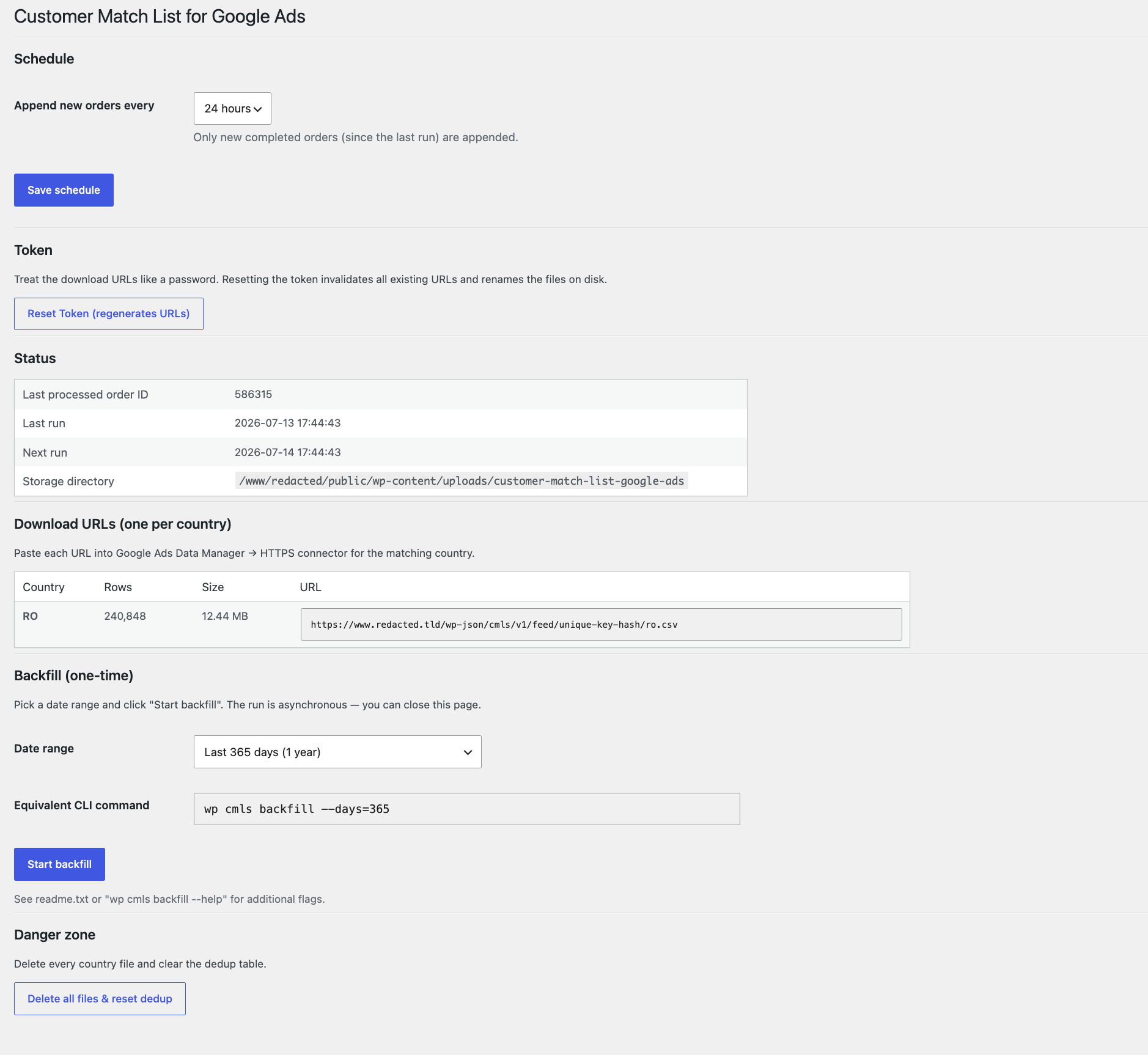
WooCommerce Marketing Customer Match List.
From there you can:
- Pick the cron interval (1/6/12/24 h).
- See the access token; reset it (regenerates every URL, renames every file).
- See per-country status: row count, file size, and the tokenized URL ready to copy.
- Start a background backfill with a date-range preset.
- Watch backfill progress live (orders processed, rows written, rows skipped, watermark).
- Delete every country file and reset the dedup table.
- Do an automated check that confirms the webserver does not expose the CSV directory via a public file listing.
WP-CLI
wp cmls backfill— one-time backfill of historical orders, split by country. Flags:--statuses=completed(default),--all-statuses,--days=N,--since=YYYY-MM-DD,--until=YYYY-MM-DD,--dry-run,--batch-size=5000,--force.wp cmls run-now— runs the incremental writer immediately (same code path as the scheduled cron).wp cmls status— prints a table with one row per country: row count, file size, URL.wp cmls reset-token— regenerates the token and renames every country file to match.wp cmls delete-file— deletes every country CSV and truncates the dedup table.
Skjermbilete
Installasjon
- Upload the plugin folder to
wp-content/plugins/customer-match-list-google-ads(or install from the WordPress.org repository). - Activate CMLS – Customer Match List for Google Ads & Meta Ads. WooCommerce must already be active.
- Go to WooCommerce Marketing Customer Match List.
- Pick an update interval (1, 6, 12, or 24 hours).
- Run the backfill:
- From the admin — pick a date range under «Backfill», click «Start backfill», and watch the progress card. You can close the tab; it keeps running.
- From the shell —
wp cmls backfill --days=540(or any range that suits you).
- After the first backfill finishes, the «Download URLs» table shows one URL per country. Copy each URL and paste it into Google Ads Data Manager HTTPS connector for the corresponding country’s Customer Match list.
Vanlege spm.
-
Why one file per country?
-
Marketing teams optimize Google Ads campaigns per country. Mixing audiences degrades match-rate signals and wastes budget on irrelevant impressions. Each country file is independent and can be wired into its own Customer Match list. Google’s Data Manager pulls each URL on its own schedule, so you can refresh some markets without affecting others.
-
How do I plug a URL into Google Ads?
-
In Google Ads Tools and Settings Audience Manager Your data sources, set up a Customer Match audience and choose the HTTPS data source. Paste the country-specific URL from the plugin’s admin page. Google Ads fetches the file on its own cadence; our plugin keeps the file fresh per the schedule you picked.
-
Google says it’s turning on «conversion-based customer lists» — do I still need this plugin?
-
Yes — they complement each other. In 2026 Google began automatically enrolling accounts that use both Enhanced Conversions and Customer Match into conversion-based customer lists (enrollment emails went out from June 2026; data processing starts August 18, 2026). Those lists are built solely from what the Google Ads tag captures on your site from that point on: customers using ad blockers or declining your consent banner never enter them, and neither do phone, imported, or historical orders.
This plugin builds Customer Match lists from the WooCommerce order database instead — every completed order, including full order history via backfill, split into one file per country, with a mailing-address fallback when an order has no email or phone. Keep both: attach the automatic conversion-based lists and the per-country lists this plugin feeds, and Google deduplicates matched customers on its side.
-
Does the file work with Meta (Facebook) Ads?
-
Yes. Meta Ads Custom Audiences use the same SHA-256 hashing of normalized (trimmed, lowercased) values, so a country CSV can be uploaded to Meta Ads Manager as a customer list — map the columns in Meta’s upload screen. Note that Meta does not pull files from URLs; the pull-from-URL workflow is Google-specific, so on Meta use manual upload.
-
How long does the backfill take?
-
Roughly 10 seconds per 150,000–200,000 orders on typical hardware. The query path is direct SQL against
wc_orders+wc_order_addresses(HPOS).
For 1M+ orders the CLI is still the most reliable option because no PHP/web timeout applies; the admin Action-Scheduler-backed runner also handles 1M+ but each batch must complete within the host’s PHP limit and if it does not then it won’t finish. -
What happens to orders with no billing country?
-
In theory it’s impossible as billing and shipping is country based; but in case this ever happens they are skipped. There is no correct file to route them to, and Google’s per-country Customer Match campaigns can’t use them anyway. The same applies to orders with an invalid country code.
-
What about orders with no email?
-
They get written. Google Customer Match accepts a row with any one of: email, phone, or full mailing address (first name + last name + zip). The plugin includes a row as long as one of those identifiers is present alongside a valid country. Deduplication is still single-column: it uses email when available, otherwise phone, otherwise the mailing address.
Google handles cross-identifier deduplication on its side after matching to a Google account — so a customer who orders once with email + phone and again with only their phone will appear as two rows in the CSV but as one user in your Customer Match audience.
-
Will the same customer appear in multiple country files?
-
Yes — but only if they actually ordered from multiple countries!
-
I ran the backfill twice — why didn’t it write more rows the second time?
-
This is by design, as every
(email, country)pair is recorded the first time it’s seen and never re-written.To regenerate from scratch (for example after toggling debug mode or changing normalization), use WooCommerce Marketing Customer Match List Danger zone Delete all files & reset dedup or
wp cmls delete-file, then run the backfill again. -
I get a 401 «REST API has been restricted to authenticated users» when I open the URL
-
Some security plugins («Admin and Site Enhancements» / ASE has this option, Disable REST API, etc.) block all unauthenticated REST traffic. This plugin does not attempt to override those policies — that would be hostile to the security setting you deliberately chose.
If you hit this error, whitelist the plugin’s feed prefix in your security plugin’s exclusion list:
/wp-json/cmls/v1/feed/. Google Ads (and any other configured consumer) needs unauthenticated GET access to that prefix — the tokenized URL is the sole authentication mechanism. -
Phone numbers — how reliable is the normalization without libphonenumber?
-
For most countries (RO, DE, UK, FR, ES, US, NL, BE, PT, IT mobile, …) it’s correct. The routine accepts
+,00, the country’s national trunk0, and bare national numbers (using the order’s billing country to fill in the dialing code).There is a known limitation for Italian landlines: in Italy the leading
0is part of the national number, not a trunk prefix, so the routine may strip a digit it shouldn’t. Italian mobile numbers (3xx) are fine.If you need strict accuracy across all locales, swap
CMLS_Writer::normalize_phone()for a libphonenumber-based implementation. -
Is WP-Cron reliable enough for the incremental updates?
-
WordPress’s built-in cron is request-triggered: it only fires if someone hits the site. On low-traffic stores it may drift. For predictable runs, configure a real system cron that calls
wp-cron.phpevery minute — standard WordPress practice and recommendation. -
Can I disable hashing for debugging?
-
Yes. use the integrated define
CMLS_DISABLE_HASHINGinwp-config.php:define( 'CMLS_DISABLE_HASHING', true ); -
Does this support High-Performance Order Storage (HPOS) / Legacy Postmeta?
-
Yes. The plugin declares
custom_order_tablescompatibility and querieswc_orders+wc_order_addressesdirectly when HPOS is enabled. On classic (postmeta) storage it falls back towp_posts+wp_postmetawith a single conditional-aggregation query per batch. -
Does the plugin send any data outside my server?
-
The plugin makes no requests to third-party services — no analytics, no tracking pixels, no telemetry. All processing happens on your WordPress install. (The directory-listing safety check is a one-second request from your server to its own uploads URL — see the directory-listing FAQ.)
However, the whole point of the workflow is that Google Ads (or any other consumer you configure) will pull the CSV from your site at the tokenized URL. Anyone in possession of that URL can retrieve a file containing:
- SHA-256 hashes of the customer’s email, phone, first name, and last name;
- the customer’s billing country and postal code in plaintext.
Treat the tokenized URL as a secret. If it leaks, use Reset Token in the admin (or
wp cmls reset-token) to invalidate all existing URLs and rename the files on disk. See the site’s Privacy Policy page — this plugin registers suggested policy text via WordPress’s Privacy tool. -
Where are the files stored?
-
wp-content/uploads/customer-match-list-google-ads/customer-match-{hash}-{country}.csv. The
{hash}is a 16-character hex derived from the secret token, so filenames are not guessable. Anindex.phpplaceholder in the directory prevents listing if your host happens to have it enabled and then it notifies the shop owner (when visiting the dashboard). -
What about directory listing?
-
The settings page does a one-second loopback HTTP request to the uploads directory URL (
/wp-content/uploads/customer-match-list-google-ads/) when you open it, caches the result for an hour, and shows one of three banners:- Green — safe. The server returned 200/401/403/404 with no listing markers (typically because the bundled
index.phpsilence file is served, or because the webserver explicitly blocks directory listings). - Red — exposed. The server returned 200 with
Index of …or with our CSV filename prefix in the body. Anyone who guesses the directory URL can enumerate your country files. Fix it: ApacheOptions -Indexes(or rely on the WordPress-shipped.htaccess); nginxautoindex off;in the relevantlocationblock. - Yellow — could not verify. The loopback request failed within the one-second budget (NAT / split-DNS / firewall blocking PHP self-calls). Open the URL shown in the notice in a private/incognito browser window — if you see a listing, restrict it; otherwise you’re fine.
The check is cached for an hour and re-runs immediately if you click Re-check now.
- Green — safe. The server returned 200/401/403/404 with no listing markers (typically because the bundled
-
What about Google’s 540-day lookback window?
-
Google Ads Customer Match uses data uploaded within the last 540 days. The plugin doesn’t enforce this so you can decide how much history to include. The «Last 540 days» preset in the backfill range dropdown matches that window. Older data is still appended if you ask for it, but Google won’t actively use it.
-
Can I include orders that aren’t `completed`?
-
Yes.
wp cmls backfill --statuses=processing,completed,on-holdfor an explicit list, or--all-statusesfor everything. The scheduled (incremental) writer iswc-completedonly by design — Customer Match doesn’t benefit from including pending or cancelled orders. -
How is the deduplication table sized?
-
One row per unique
(email_hash, country). At ~110 bytes per row, 1M unique customers across all countries is roughly 100 MB. -
Will deactivating WooCommerce break it?
-
The plugin’s admin page shows a notice and stops scheduling cron, but data isn’t lost. Re-activate WC and the plugin resumes from the noted order.
If you uninstall the plugin then the
uninstall.phproutine cleans up the option keys, database tables, and any generated files. -
GDPR / privacy
-
The files contain hashed personal information (email, phone, name) and plaintext country + ZIP. Treat the directory and its access URLs as sensitive data!
The plugin only creates files on your own server and does not read consent-management records: every order in the selected range is exported as-is. Whether a given customer may be included in an advertising audience — and whether Google or Meta may receive the file — depends on your store’s consent setup and local legal requirements; applying them is your responsibility as the data controller.
If a customer requests deletion under GDPR / similar:
- Delete or anonymize the WooCommerce order(s).
- Run Danger zone Delete all files & reset dedup (or
wp cmls delete-file). - Re-run the backfill — the deleted customer is gone from the files.
Targeted per-row deletion isn’t supported on purpose: the SHA-256 hashing is one-way and rebuilding from source is fast.
Omtalar
There are no reviews for this plugin.
Bidragsytarar og utviklarar
“CMLS – Customer Match List for Google Ads & Meta Ads” is open source software. The following people have contributed to this plugin.
Contributors
Omset “CMLS – Customer Match List for Google Ads & Meta Ads” til ditt eige språk.
Interested in development?
Les kjeldekoden, sjekk SVN-lageret eller abonner på utviklingsloggen med RSS.
Endringslogg
1.1.2
- Orders that turn «completed» late (delayed payments, manual completion) are now appended the moment they complete instead of being missed by the scheduled writer.
- «Delete all files & reset dedup» no longer causes the next scheduled run to rebuild the entire order history — rebuilding stays explicit via backfill.
- New FAQ on Google’s automatic conversion-based customer lists.
1.1.1
- Consistent plugin name: «Customer Match List for Google Ads». The exported files also work for Meta Ads Custom Audiences (see FAQ) — same hashing.
- Confirmed compatibility with WooCommerce 10.9.
- Readme and documentation cleanup. No functional changes.
1.1.0
- Feed URLs now end in
.csvso Google Ads» HTTPS connector accepts them. - Hashing normalization aligned with the Google Customer Match spec (Unicode-aware lowercase, name punctuation stripping, US ZIP truncation, double-hash guard).
- Fresh activations no longer sweep historical orders — backfill is explicit (admin button or WP-CLI).
- Admin JS moved into enqueued, page-scoped files.
- Added suggested privacy-policy text, sub-100-row serving warning, CSV-injection hardening on zip values, and removed the REST authentication override.
1.0.0
- Initial release: per-country CSVs with
(identity, country)dedup, WP-CLI and Action Scheduler backfills, tokenized REST download endpoint, HPOS-first SQL.