

Skildring
Stores with years of orders get a slow Orders screen, slow searches and heavy database queries. Nextial Order Archive moves old, finished orders out of the live WooCommerce order tables into archive tables, so WooCommerce works on the orders that matter today.
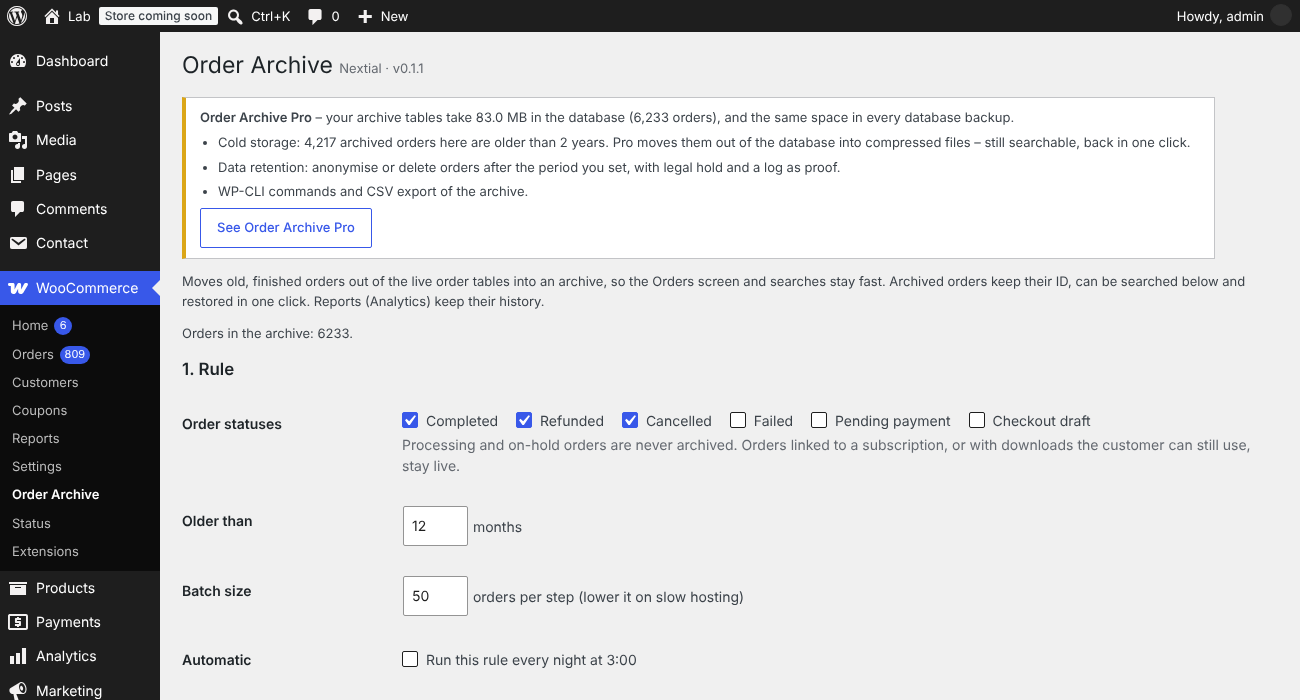
- Rules: choose the statuses (completed, refunded, cancelled, failed…) and the age, for example «completed orders older than 12 months».
- Preview first: see how many orders match, and which ones stay live, before anything moves.
- Background batches: Action Scheduler moves small batches one after another, so the store never slows down. Stop at any time.
- Automatic: optionally run the rule every night.
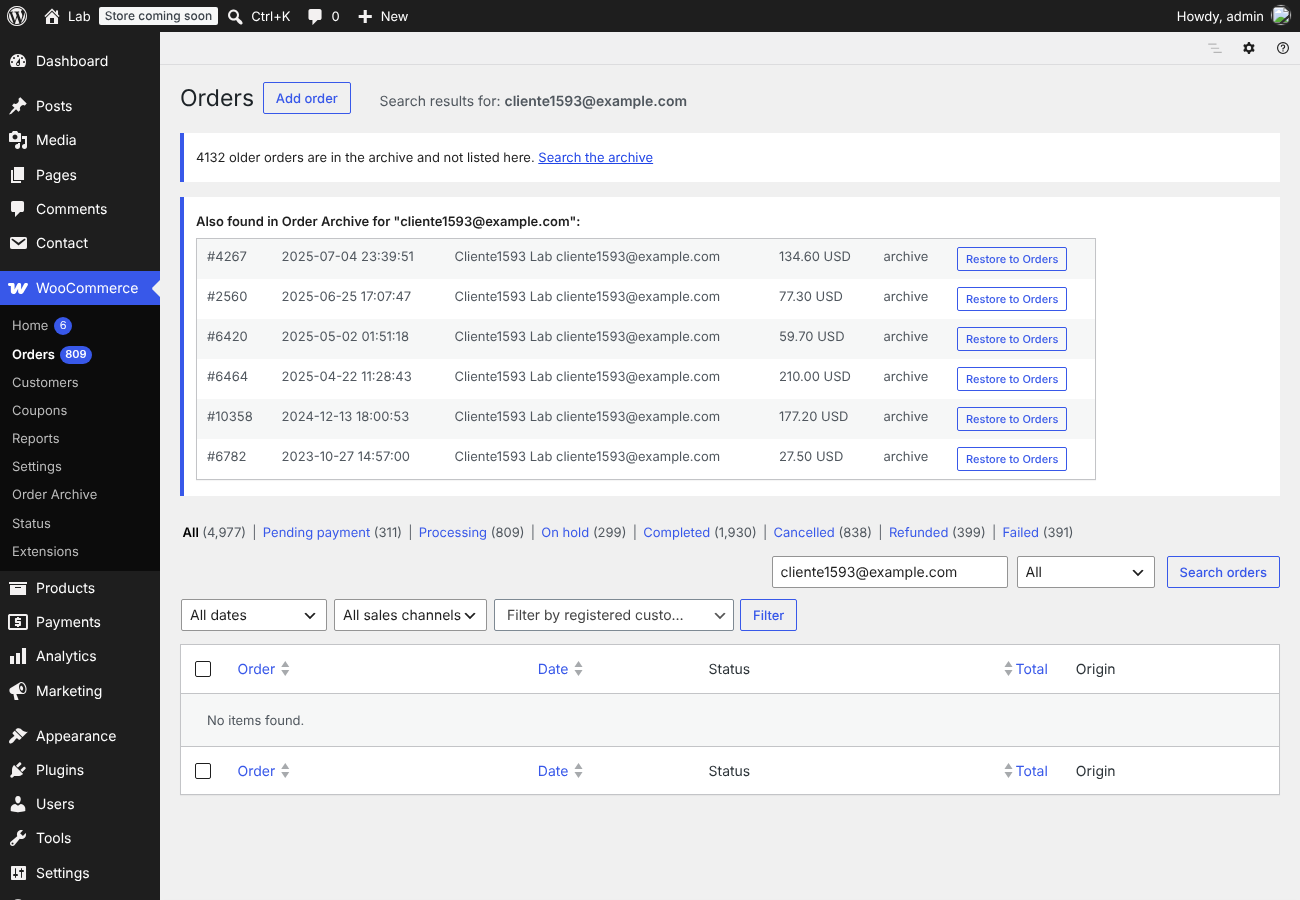
- Search the archive by order number, e-mail or customer name.
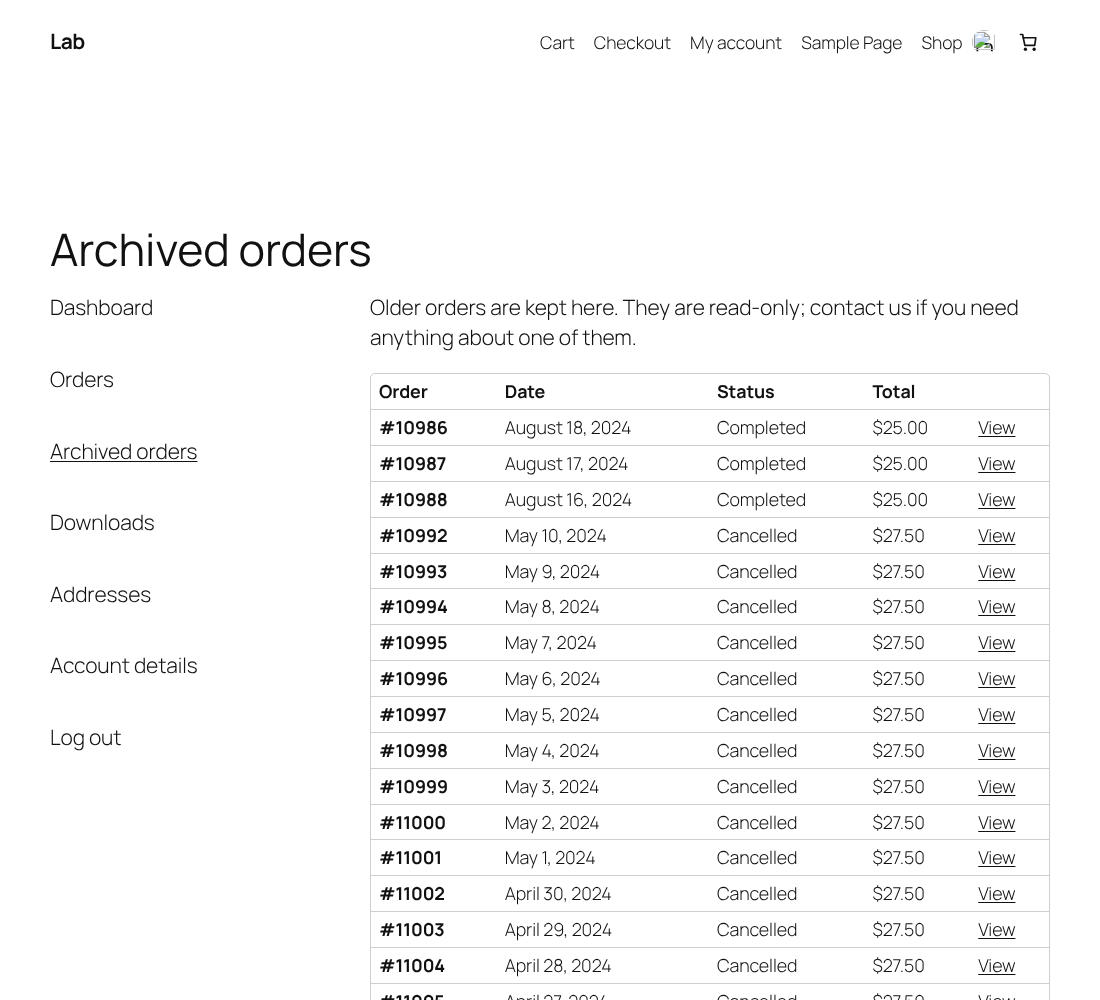
- Customers still see their old orders: an «Archived orders» tab in My Account lists them, read-only, with items, totals, refunds and addresses. Only the customer’s own orders, and only if they have any. You can switch it off.
- Restore in one click: the order comes back with the same ID, items, notes and refunds. A restored order is never archived again automatically.
- Reports keep their history: WooCommerce Analytics tables are not touched.
Safe by design
- Every batch runs inside one database transaction: rows are copied, every row count is checked, and only then are the live rows removed. Any difference rolls the batch back and nothing is moved.
- An order moves with everything that belongs to it: addresses, operational data, meta, line items and their meta, order notes and child refunds.
- Order IDs stay reserved (HPOS placeholder posts are kept), so a restored order gets its own ID back and no new order can take it.
- Orders linked to WooCommerce Subscriptions and orders with downloads the customer can still use are never archived. Processing and on-hold orders are never archived.
- Requires High-Performance Order Storage (HPOS) with compatibility mode off, so orders live in one place only. The plugin checks this and does nothing otherwise.
- Uninstalling the plugin never deletes the archive.
What to know
- Archived orders are not shown in WooCommerce Orders, and in My Account they appear only in the «Archived orders» tab (not under Orders). Guest orders (no customer account) are not shown to customers. Restore an order to show it everywhere again.
- Other plugins that keep their own data about orders (for example invoices or shipping labels) keep it; they will not find the order while it is archived.
- Make a database backup before the first run.
Skjermbilete

Installasjon
- Install and activate the plugin, then open WooCommerce Order Archive.
- Choose statuses and age, then press Save and preview: nothing is moved.
- Make a database backup, then press Archive matching orders now.
- Optional: tick Run this rule every night.
Vanlege spm.
-
Does it work without HPOS?
-
No. The plugin needs High-Performance Order Storage, the default order storage of WooCommerce for new stores. Turn it on in WooCommerce Settings Advanced Features and turn compatibility mode off.
-
Can I get an order back?
-
Yes, from WooCommerce Order Archive Archived orders Restore. It returns with the same ID and all its data.
-
What happens to reports?
-
Nothing: WooCommerce Analytics keeps its own tables, which this plugin never changes.
-
What if I uninstall the plugin?
-
Settings are removed, the archive tables are kept. Reinstall the plugin to search or restore archived orders.
-
Can customers see their archived orders?
-
Yes. From 0.1.1 an «Archived orders» tab appears in the customer’s My Account page, only if they have archived orders. It is read-only and shows only their own orders. Orders placed as a guest (no account) are not shown. You can switch the tab off in WooCommerce Order Archive.
-
Is it safe on a big store?
-
Each batch runs in one database transaction and every row count is checked before the live rows are removed; if anything differs, the batch is rolled back. Use the preview first and make a database backup before the first run.
Omtalar
There are no reviews for this plugin.
Bidragsytarar og utviklarar
“Nextial Order Archive – Archive Old Orders for WooCommerce (HPOS)” is open source software. The following people have contributed to this plugin.
Contributors
Omset “Nextial Order Archive – Archive Old Orders for WooCommerce (HPOS)” til ditt eige språk.
Interested in development?
Les kjeldekoden, sjekk SVN-lageret eller abonner på utviklingsloggen med RSS.
Endringslogg
0.1.1
- New: «Archived orders» tab in My Account, so customers keep seeing their old orders (read-only, on by default, can be switched off).
- Faster preview and batches on large stores: the exclusion rules run as one SQL query (6,363 orders: 5.9 s 0.07 s in our test).
- New hook nextial_oa_admin_after for add-ons.
0.1.0
- First release: rules by status and age, preview, background batches with transaction and row-count checks, nightly runs, archive search, one-click restore.