

Skildring
The plugin increases security of a site in case it has no SSL certificate,
useful for owners of small sites who want to secure their passwords and
other posted data but don’t want to buy SSL certificate for each domain
and subdomain: it protects from sniffering the most important data such as
passwords when they are being sent from forms of your site to the server.
When the form served by the plugin is submitted all input data are being
joined into a string, then this string is being encrypted with AES algorythm
by disposable key and only encrypred string will be sent.
A browser encrypts the disposable key in javascript by the RSA public key
and sends it to the server; then the server decrypts it with the RSA private
key and then use it to decrypt the posted data with AES.
Translations included: Ukrainian, Russian, German and Brazilian Portuguese.
I just adapted usage in WordPress the jCryption jQuery plugin, v. 3.1.0.
Please check www.jcryption.org to learn how jCryption works.
Skjermbilete

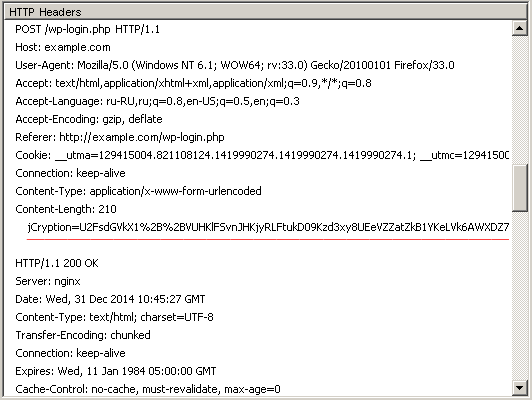
Installasjon
Upload wp-jcryption.zip using the wordpress plugin installation interface and activate the plugin. On the very first activation 1024-bit RSA key pair will be generated and the list of forms the plugin is primarily destinated for will be saved. You may add other form IDs to this list on the plugin settings page: Settings – WP jCryption.
Vanlege spm.
- Installation Instructions
-
Upload wp-jcryption.zip using the wordpress plugin installation interface
and activate the plugin. On the very first activation 1024-bit RSA key pair
will be generated and the list of forms the plugin is primarily destinated
for will be saved. You may add other form IDs to this list on the plugin
settings page: Settings – WP jCryption. - Why should I use this plugin?
-
If you don’t use https on your site your password could be stolen through
man-in-the-middle attack when you are submitting log-in form because form data
(including password) are being sent as plain text. This plugin encrypts submitted
data in a way similar to https transmission. - Does this plugin encrypts transmission of my site pages entirely?
-
No. The plugin encrypts only data being posted from most important forms
(that contain password fields: login, reset password, user profile)
and forms you specify additionally. To secure all incoming and
outgoing traffic of your site a SSL certificate is needed. - I have SSL certificate installed on my site already. Do I need to install the plugin?
-
No.
- Can I check whether the form data are being sent encrypted?
-
Yes, you can do it by means of Firefox LiveHTTPHeaders extension, Fiddler or similar tools.
- What are system requirements for the plugin?
-
PHP version >= 5.3 with OpenSSL PHP extension.
- Do I need to generate RSA private and public key files with Linux commands?
-
No. PHP generates keys for you and save them in a database. So, this plugin is usable on (almost) any shared hosting.
- The plugin works with login form but disables other form during it’s being submitted.
-
Try to enable the plugin option: Fix button id=»submit» and name=»submit».
Omtalar


Bidragsytarar og utviklarar
“WP jCryption Security” is open source software. The following people have contributed to this plugin.
Contributors
Omset “WP jCryption Security” til ditt eige språk.
Interested in development?
Les kjeldekoden, sjekk SVN-lageret eller abonner på utviklingsloggen med RSS.
Endringslogg
0.5.1
- Minified javascript.
0.5
- Minified javascript.
- Changed endpoint URL to avoid it got cached by caching plugins.
- Unset session jCryptionKey after decryption.
0.4.1
- German and Brazilian Portuguese translations by Matthias.
0.4
- removed unnecessary printing $_POST in the end of wp_jcryption_entry function
(it was there for testing purpose but could be a target for XSS, thanks to Konstantin Kovshenin for this notice).
0.3
- «fix_submit» plugin setting is checked on install to let the plugin work with the user profile form;
- testing of system requirements enhanced.
0.2
- jCryption entry point moved into the «plugins_loaded» action.
0.1
- initial version, with separate entry point file using SHORTINIT.